

Table of contents
11 sections · 8 min read
In short
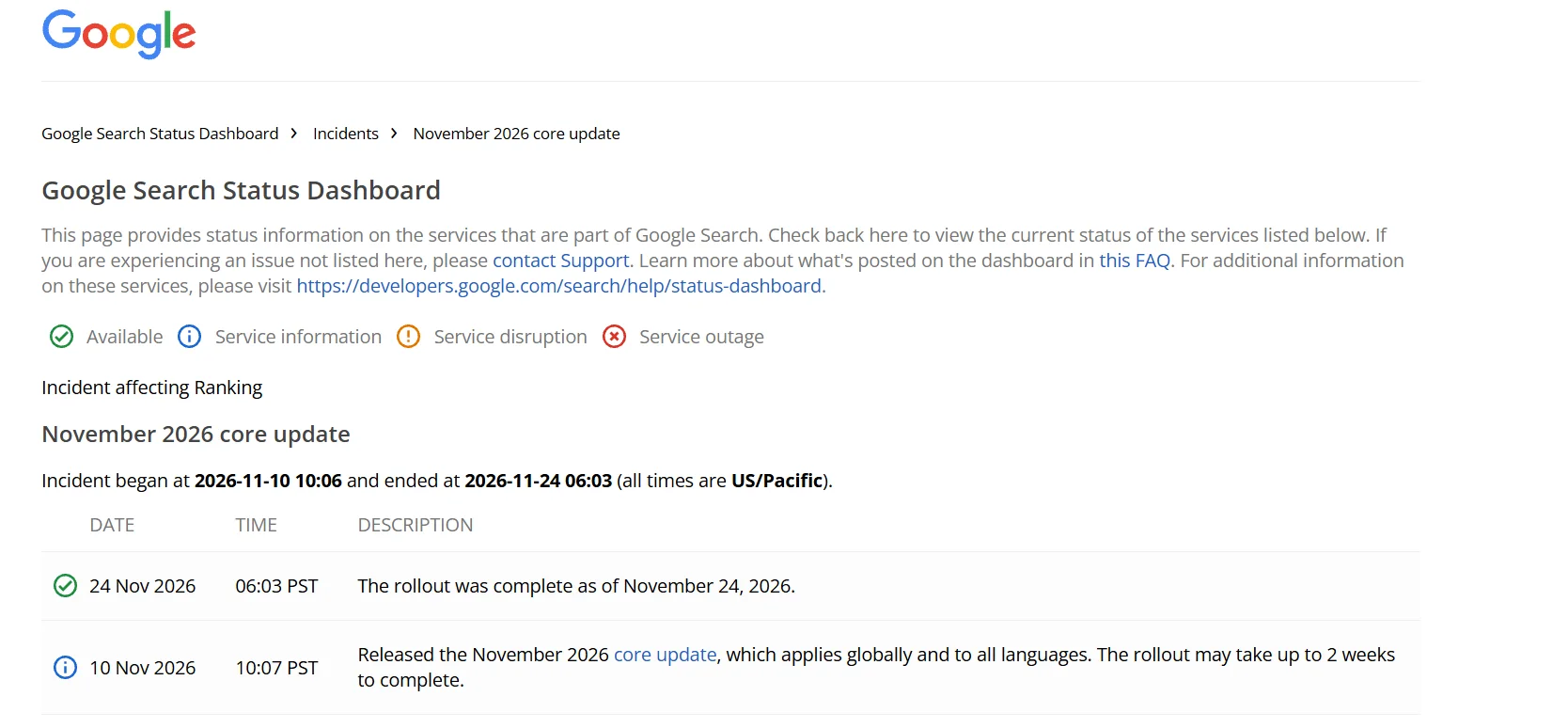
- Google’s November 2026 core update ran from November 10 to November 24. Google has not said what it changed.
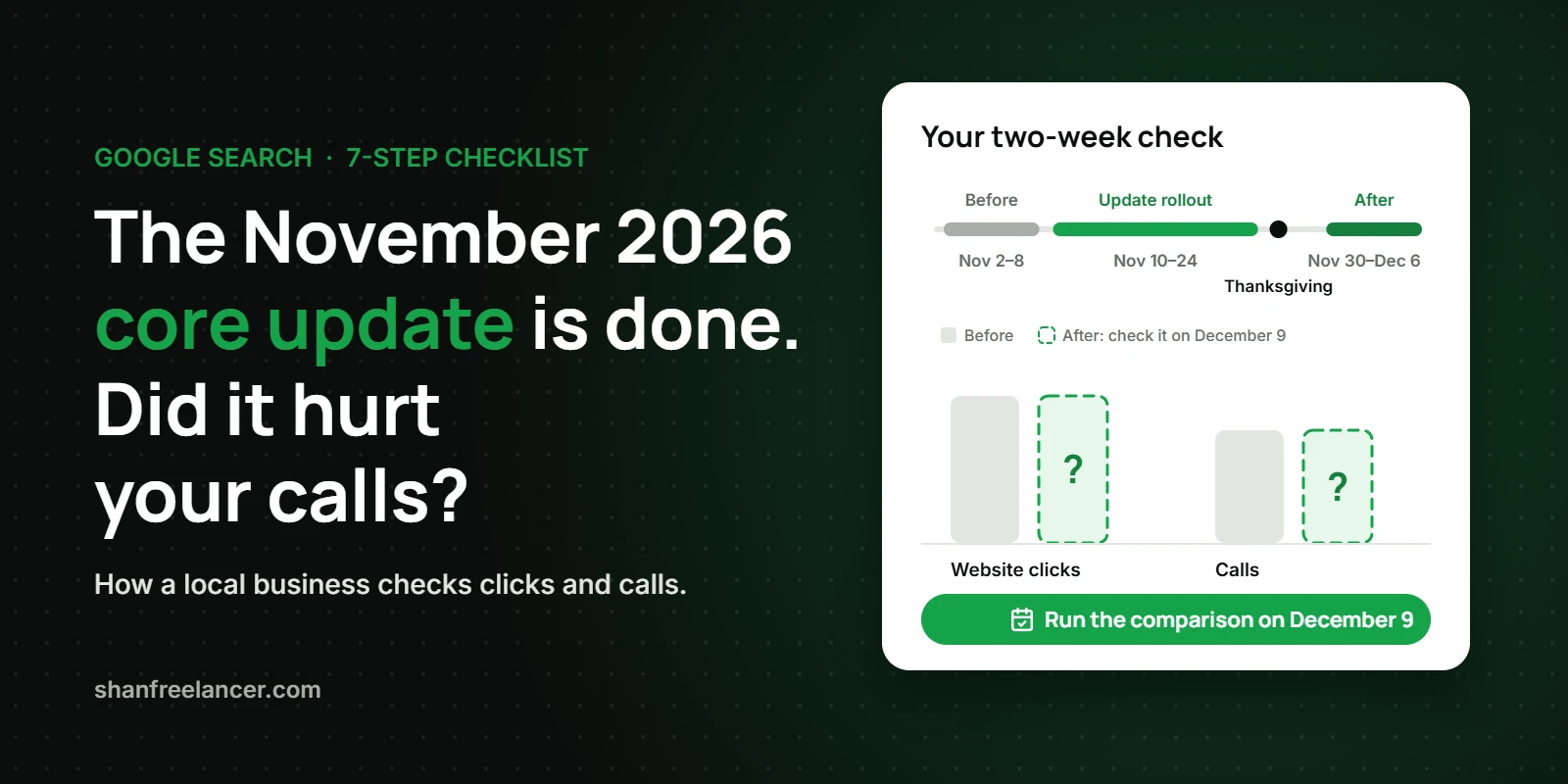
- Wait at least a week, then compare Monday, November 2 to Sunday, November 8 with Monday, November 30 to Sunday, December 6. Skip Thanksgiving week.
- Check your website clicks in Search Console and your calls from your Business Profile separately, then size any drop before you change anything.
If you own a roofing, plumbing, HVAC or dental business, you probably have one question: did this hurt my calls?
You cannot answer that today. A fair answer needs about two weeks of data, and nobody has it yet. This post gives you a checklist to follow while you wait, and shows you how to read your numbers when the time comes.
Google has not said what it changed, so I will not guess. Everything below is about checking your own business.
What we know for certain
The facts come from Google’s Search Status Dashboard.
The facts
- The update began on November 10, 2026.
- Google said it applies globally and to all languages.
- Google marked it complete on November 24, 2026. It took about 14 days.
- It is the third core update of 2026.
Google named no industry, no type of website and no specific cause.
Google’s own guide to core updates explains the rest. Core updates are broad changes to its ranking systems, and Google makes them several times a year. They do not target specific sites or pages. Most sites do not need to act on them and may not even notice one.
Google explains it with a restaurant list. Imagine you wrote down your 20 favorite restaurants a few years ago. Today you would rewrite that list. New places have opened, and your opinion of some old ones has changed. A restaurant that moves down the list is not a bad restaurant. Others moved ahead of it.
Your website works the same way. A lower position after a core update does not mean you did something wrong.
So your business was probably not affected. The steps below are how you confirm it.
Step 1: wait one full week before you look
Google recommends waiting at least a full week after an update completes before you study your numbers. It is the hardest step, because waiting feels like doing nothing.
Rankings can move a lot during a rollout. If you checked your traffic last week and felt worried, ignore that reading.
A second reason to wait: ThanksgivingFor a US business, the first week after this update is Thanksgiving week. Thanksgiving is on November 26, followed by Black Friday and the weekend. People search and call differently that week, so a quiet phone on Thanksgiving tells you nothing about Google.
Step 2: pick two weeks you can compare fairly
Google’s guide says to compare a week after the update ended with a week before it began. For this update I would use these two weeks.
BeforeMonday, November 2 to Sunday, November 8
AfterMonday, November 30 to Sunday, December 6
Both run Monday to Sunday, so each holds the same weekdays. That matters for a local business, because your Mondays are probably busier than your Sundays. If you compare a Tuesday with a Saturday, you will see a “drop” that is only the calendar.
I skipped the week of November 23 on purpose, because of Thanksgiving.
Put it on your calendar nowSearch Console data arrives a couple of days late, so the earliest good day to run this check is around December 9.
Step 3: check your website clicks in Search Console
Search Console is Google’s free tool that shows how people find your website in search. If you do not have it, ask whoever built your website to set it up.
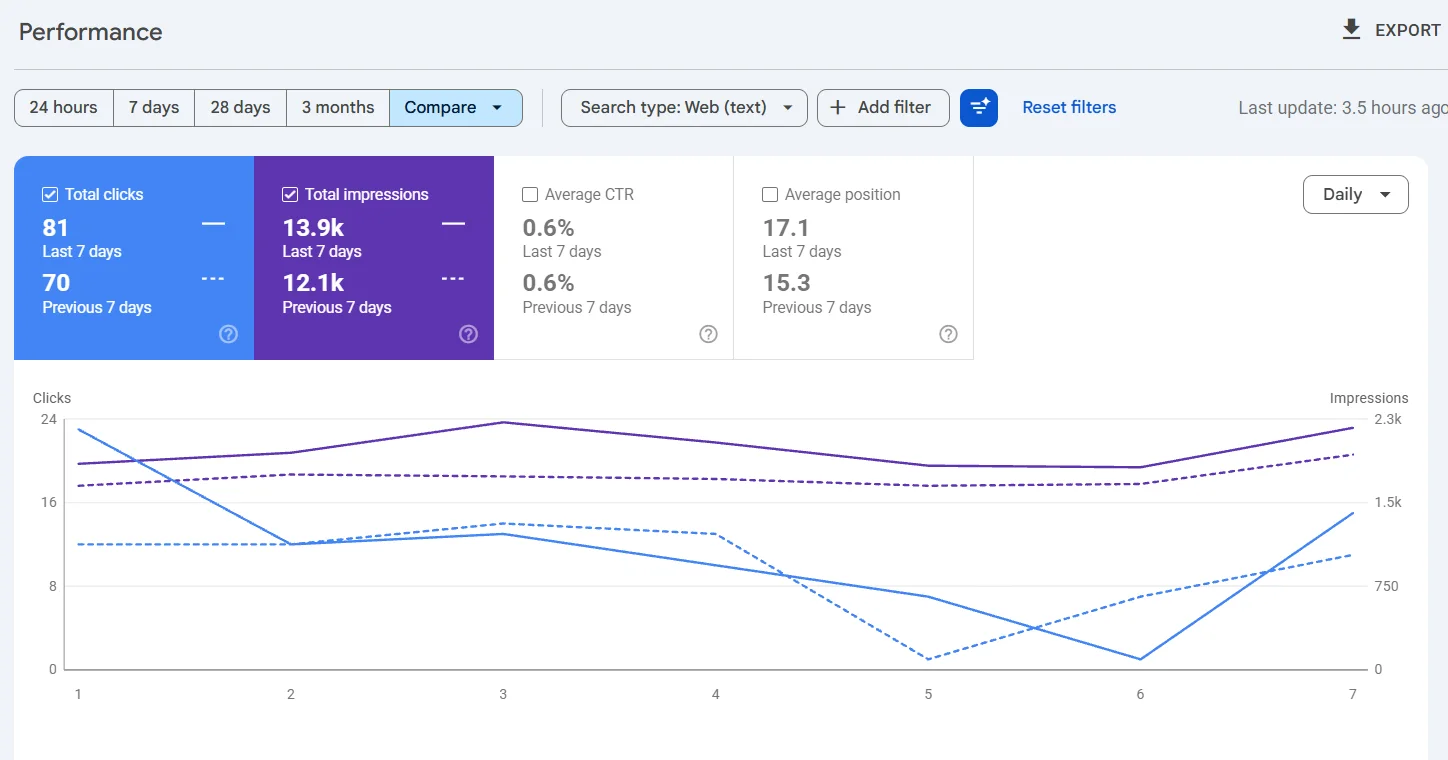
- Open the “Performance” report for search results.
- Set the search type to “Web”.
- Open the date filter, choose “Compare”, and enter the two weeks from step 2.
- Filter by country and choose the United States.
- Look at total clicks for each week.
- Open the “Pages” tab. See which pages gained or lost clicks.
- Open the “Queries” tab. See which searches changed.
Google’s guide also says to check each search type separately: Web, Images, Video and News. For most local service businesses, “Web” is where the clicks are. If your work sells through photos, such as kitchen remodels or cosmetic dentistry, repeat the comparison with the search type set to “Image”.
A tip from my own workSeparate searches for your business name from all other searches. Someone who types your company name already knows you, and those clicks usually hold steady. Watch the searches like “roof repair” plus your city.
Step 4: check your calls separately from your website
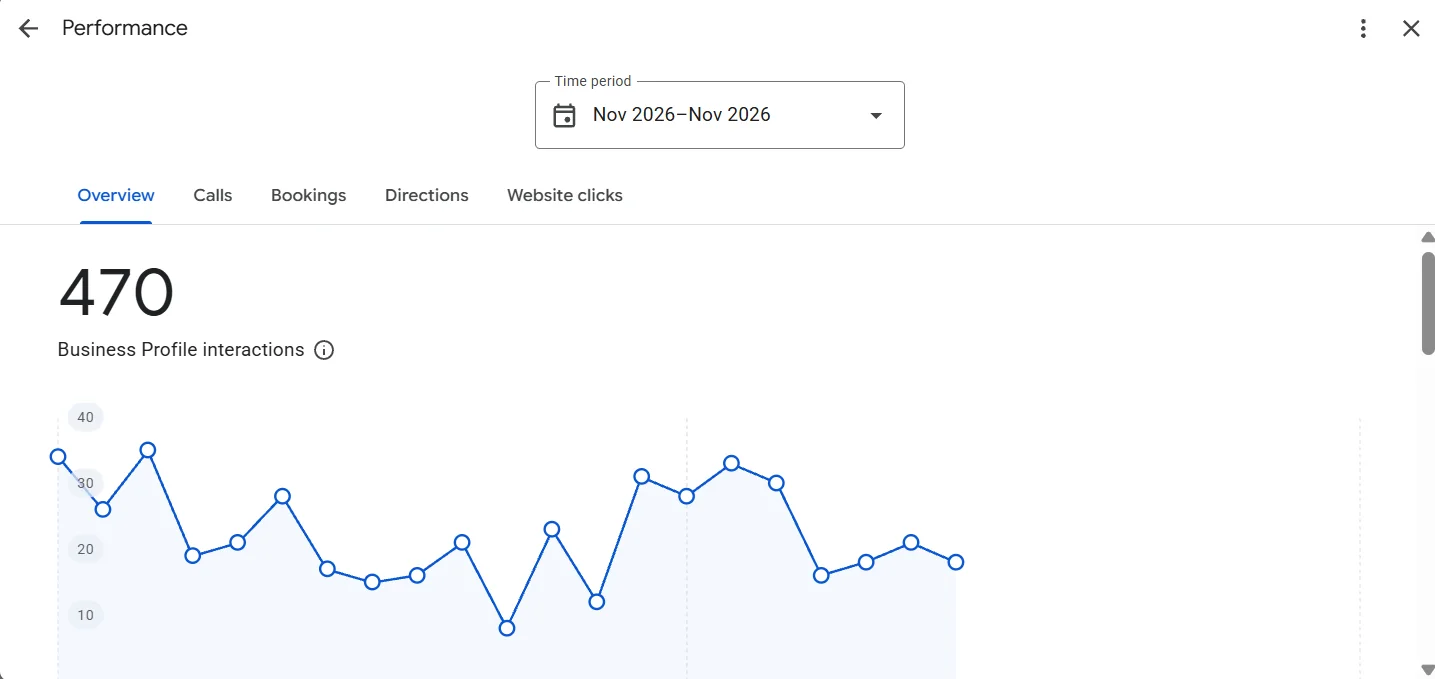
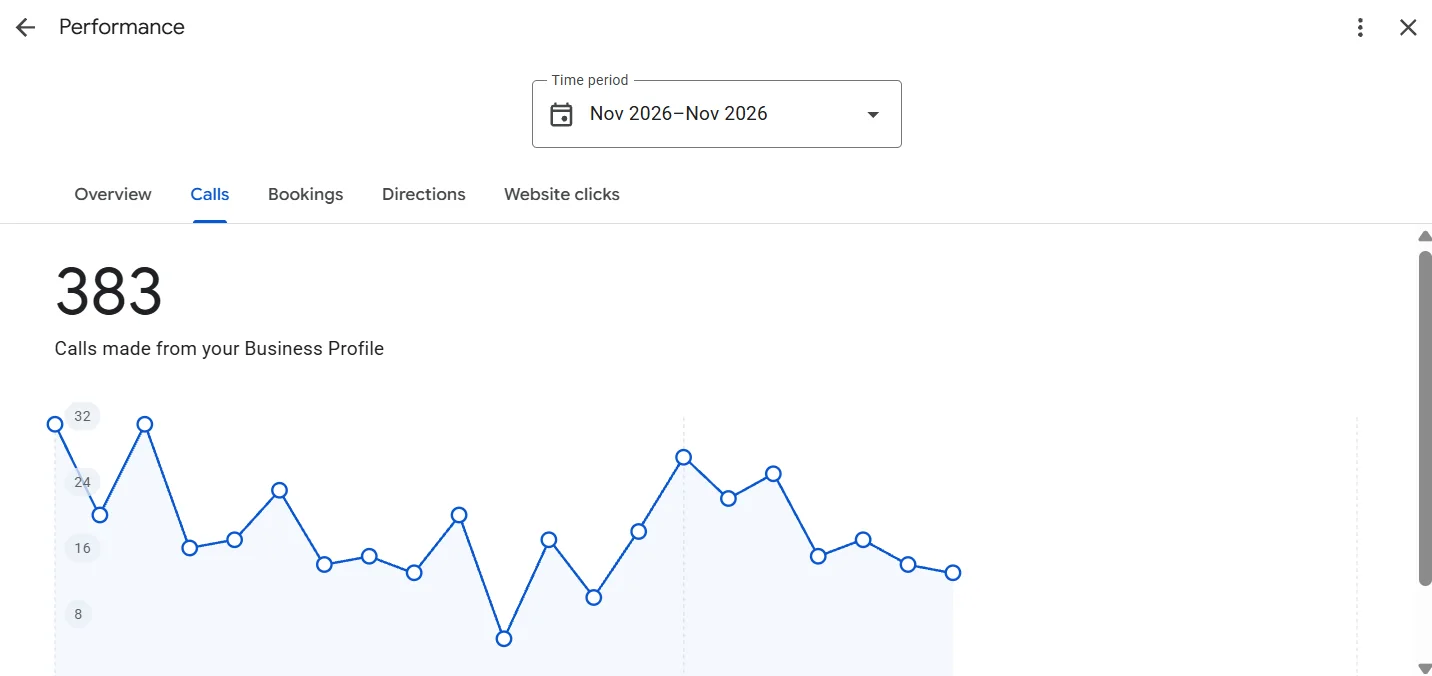
Search Console only knows about clicks to your website. It knows nothing about phone calls from your Google Business Profile. For a local service business, a large share of calls can come from the profile on Google Maps and never touch the website.
The status dashboard lists this update as a change to search ranking, and Google has said nothing about Google Maps in connection with it. So do not assume your Maps calls moved because your website clicks moved, or the other way around. Check both, in three places.
- Your Google Business Profile performance report. Note the calls, direction requests and website clicks. Use the same two weeks if the date picker allows it.
- Your phone records or call tracking. Count real inbound calls for the same two weeks.
- Your booked jobs. This is the number that pays the bills.
Write all of these down next to your Search Console clicks.
Step 5: read the result
You now have two sets of numbers, website clicks and calls. That gives four possible results.
| Website clicks | Calls | What it probably means | What to do |
|---|---|---|---|
| Steady | Steady | The update did not affect you | Nothing. Go back to work |
| Down | Steady | Some pages lost position, but your profile still brings calls | Go to step 6 and size the drop |
| Steady | Down | Probably not the core update | Check your profile and your phone setup |
| Down | Down | Could be the update, the season, or both | Go to step 6, then rule out other causes |
If calls fell while website clicks held, look at your Business Profile first. Are the hours correct? Is the phone number right? Is the profile still live? Did a button change? Google edits profiles without telling owners.
Step 6: size the drop before you react
Google’s guide separates a small drop from a large one.
Small dropSomething like position 2 to position 4. Google says no drastic action is needed, and warns against changing content that still performs well.
Large dropSomething like position 4 to position 29. That calls for a deeper look.
Check this page by page in the “Pages” and “Queries” tabs. One page that slipped two places is normal movement. Ten important pages that fell off the first page is a real change.
Google also reminds site owners that rankings are never fixed. They shift as the web changes and as people search differently, so some rise and fall in traffic is normal in any month.
Step 7: rule out the ordinary causes
Before you blame Google, check the boring explanations.
Check these first
- Season. Late November and early December are slow for some trades and busy for others. Compare with the same weeks last year if you have the data.
- Website changes. Did anyone redesign a page, change a URL or install a plugin in November?
- Broken tracking. Is the call tracking number still working? Is the contact form still sending emails?
- Weather. A storm or a cold snap can change demand for roofers and HVAC companies within days.
What not to do
A drop makes people want to act fast. Google’s guide warns against quick fixes, and I agree.
- Do not delete pages in a hurry. Google calls deleting content a last resort, for pages that cannot be saved.
- Do not rewrite pages that still bring calls.
- Do not remove parts of your pages because a forum post said they hurt rankings. Google’s guide names this exact mistake.
- Do not change your Business Profile categories or business name in a hurry. Those changes carry their own risk.
- Do not buy a “core update recovery” package from someone who claims to know what Google changed.
Deleting has one exception. Google says that if you are thinking about removing whole sections of a site, those sections were probably built for search engines and not for people. On a local business site, that could be dozens of near-identical city pages. Removing pages like that can help your good pages perform better.
If you have a large drop that lasts
Run the full comparison first. If important pages are still far down by mid-December, follow Google’s advice.
Look at the whole site, and not only the pages that fell. Google publishes a list of self-assessment questions for “helpful, reliable, people-first content”, and its core updates guide links to it. Go through those questions honestly. Better still, ask someone you trust who has no stake in your business to do it, and to compare your pages with the ones that now rank above you.
Then improve your pages in ways a customer would notice. Google’s example is rewriting or restructuring a page so it is easier to read and navigate. For a service business, I would add clearer answers, real photos of your work, and prices or price ranges where you can give them.
Be patient with the result. Google says some changes take effect within days, and others take months, because its systems need time to confirm that a site is consistently helpful. If several months pass with no change, the next core update may be the next chance. You do not always have to wait that long, though. Google also makes smaller core updates all the time without announcing them, and those can lift a page you have improved. Nothing is guaranteed either way.
Want a second opinion on your numbers?
I can run this comparison for you. I will check your Search Console data and your Google Business Profile for the same two weeks, and tell you plainly if anything changed.